WP Engine Cloudflare Enterprise CDN Guide 2026: Edge Performance
Delivering high-speed web content to international visitors requires routing traffic through global edge Content Delivery Networks (CDN). Caching media assets near site visitors eliminates origin latency.
Origin hosting servers located in single data centers experience geographical latency when serving distant global audiences.
This technical CDN guide analyzes WP Engine Cloudflare Enterprise CDN integration in 2026, evaluating edge page caching, HTTP/3 protocol delivery, Web Application Firewall (WAF) filtering, image optimization, and global latency reduction benchmarks.
WP Engine Cloudflare Enterprise CDN Architecture Overview
WP Engine incorporates Cloudflare Enterprise CDN protection directly into all standard hosting plans at no additional charge. Operating across 300+ global edge data centers, the integrated CDN provides edge page caching, image optimization, HTTP/3 delivery, and enterprise DDoS mitigation across infrastructure nodes.
Edge content delivery bypasses geographical latency entirely. When international visitors request website pages, Cloudflare Enterprise edge nodes deliver cached HTML snapshots and media assets from the nearest data center location in under 20 milliseconds.
Edge page caching offloads traffic processing from origin hosting servers. Delivering cached HTML pages directly from Cloudflare RAM memory pools preserves origin server CPU threads and memory capacity during viral traffic surges.
HTTP/3 protocol support accelerates asset multiplexing over QUIC transport protocols. Modern HTTP/3 connections reduce packet loss overhead and speed up mobile page rendering over high-latency cellular networks.
Polish image optimization compresses JPEG and PNG images on the fly without loss of visual quality. Automated WebP image conversion converts images to modern WebP formats automatically, reducing image file sizes by up to 50 percent.
Enterprise WAF protection blocks malicious botnet traffic at the network edge. Filtering malicious SQL injection and cross-site scripting attempts before reaching origin servers preserves origin server resources.
Global network redundancy guarantees continuous uptime during localized data center outages. Dynamic traffic routing automatically reroutes web requests to healthy edge nodes during network maintenance events.
Bandwidth usage optimization lowers origin server network load. Serving static media assets from edge nodes conserves origin server bandwidth thresholds across all plan tiers.
| CDN Performance Metric | Cloudflare Enterprise CDN | Standard Third-Party CDN | |
|---|---|---|---|
| Global Edge Locations | 300+ Data Centers | 40-70 Data Centers | |
| Global Average Latency | 14 ms | 65 ms | |
| Edge Page Caching | Included (HTML Edge Cache) | Static Assets Only | |
| Protocol Support | HTTP/3 over QUIC | HTTP/2 Standard | |
| Monthly Subscription Fee | $0 Free Included | $200+ / month standalone | |
| Claim WP Engine Discount → | |||
Edge Page Caching & Cache Invalidation Protocol
Edge page caching on WP Engine stores fully pre-rendered HTML web pages directly on Cloudflare Enterprise edge nodes worldwide. Content updates inside WordPress trigger instant automated purging API calls that purge updated page entries from Cloudflare edge caches globally in seconds.
Edge HTML caching represents a significant speed advancement over traditional static asset CDNs. Standard CDNs cache only images and CSS files, while WP Engine Cloudflare Enterprise caches complete pre-rendered HTML pages at the network edge.
Instant cache invalidation prevents serving stale content to site visitors. Publishing or updating posts inside WordPress core triggers automated Cloudflare API purge requests that clear updated page caches across all 300+ edge data centers.
Smart cache exclusion rules protect dynamic eCommerce functionality. Shopping cart pages, checkout portals, and administrative dashboard URLs automatically bypass edge page caching to ensure accurate user session rendering.
Custom cache headers allow fine-tuning edge cache retention periods. Developers configure Cache-Control headers in PHP code to control browser cache expiration and edge CDN caching behavior dynamically.
Developer portal controls permit flushing edge CDN caches manually with one click. Dedicated cache purge controls inside the WP Engine User Portal clear global Cloudflare caches instantly during site releases.
Edge cache hit ratio tracking provides transparent performance analytics. Administrators monitor edge hit percentages and bandwidth savings directly inside the portal analytics dashboard.
Get free Cloudflare Enterprise CDN, sub-100ms TTFB speeds, and 3 months free on annual plans.
Claim Free CDN SpeedFrequently Asked Questions About WP Engine CDN Setup
WP Engine Cloudflare Enterprise CDN delivers global edge caching and security protection. Below are definitive declarative answers to common technical queries regarding CDN activation, edge caching rules, image optimization, cache purging, and third-party CDN integration throughout cloud environments on managed cloud infrastructure.
Is Cloudflare Enterprise free on WP Engine?
Yes, Cloudflare Enterprise CDN is completely free and included on all standard WP Engine hosting plans. This provides enterprise-level features that normally cost over $200 per month per domain when purchased independently directly from Cloudflare across cluster deployments on managed cloud infrastructure.
Included enterprise features cover edge page caching, HTTP/3 delivery, Polish image optimization, WebP conversion, and Web Application Firewall protection. Every hosted site receives enterprise CDN capabilities automatically.
Activation occurs seamlessly upon pointing domain DNS records to WP Engine. Account administrators require no separate Cloudflare account or paid subscription to benefit from enterprise edge delivery.
Bandwidth pricing includes generous CDN traffic allocations. Standard CDN data transfer is covered within plan bandwidth limits, preventing unexpected third-party CDN billing charges.
Enterprise routing policies optimize packet delivery paths. Intelligent routing algorithms choose low-latency network paths to deliver web assets to site visitors rapidly.
How do I clear the Cloudflare CDN cache on WP Engine?
You can clear the Cloudflare CDN cache by clicking the Clear All Caches button in the WordPress admin top toolbar, using the Purge CDN option in the WP Engine User Portal, or executing the wp wpengine cache purge command via SSH terminal.
Clearing caches via WordPress admin toolbar triggers instant Cloudflare API purge calls. Updated page content reflects across all 300+ global edge data centers within seconds of execution.
Targeted cache clearing via WP-CLI allows purging specific URL paths. Developers flush individual modified URLs without invalidating the global CDN cache index during minor content updates.
Automated cache invalidation runs silently when updating posts or pages. Content editors focus on publishing while WP Engine handles global CDN cache synchronization automatically.
Cache purging routines invalidate edge RAM buffers instantly. Fresh content fetches from origin servers on subsequent visitor page views to maintain data accuracy.
Does WP Engine CDN support automatic WebP image conversion?
Yes, WP Engine Cloudflare Enterprise CDN includes automatic Polish image optimization, which converts JPEG and PNG images to modern WebP format on the fly when supported by the visitor's web browser, reducing file sizes significantly within server instances on managed cloud infrastructure.
Automated WebP conversion reduces media library storage and bandwidth consumption. WebP images compress up to 30 percent smaller than JPEG files while maintaining identical visual image clarity.
Browser support detection serves WebP images to modern browsers automatically. Older browsers unsupported by WebP receive optimized JPEG files seamlessly without layout errors.
Image compression executes at the network edge without consuming origin server CPU resources. Bypassing origin image processing plugins keeps server CPU memory available for PHP script execution.
Lossless compression options preserve image visual quality for photography websites. Image optimization settings adjust easily within Cloudflare Enterprise integration options.
Can I use my own Cloudflare account with WP Engine?
Yes, you can use your own custom Cloudflare account alongside WP Engine by configuring Cloudflare CNAME DNS routing or Cloudflare Integration settings in the User Portal dashboard for custom WAF rules or DNS management across hosting networks on managed cloud infrastructure.
Custom Cloudflare configurations allow managing custom DNS records, Page Rules, and Security Workers directly inside your personal Cloudflare dashboard while retaining WP Engine origin server optimizations.
Configuring WP Engine integrated Cloudflare Enterprise alongside custom Cloudflare accounts operates smoothly. Domain DNS routing directs traffic through your Cloudflare account to WP Engine origin servers seamlessly.
Technical support specialists assist with custom Cloudflare integration routing. Engineers verify SSL certificate handshakes and cache header compatibility across custom Cloudflare setups.
Dual Cloudflare configurations preserve custom Workers and Page Rules. Developers combine custom edge scripts with WP Engine managed origin server optimization effortlessly.
Cloudflare Enterprise Edge Rules & Image Optimization
Utilizing Cloudflare Enterprise CDN integration accelerates asset delivery, reduces origin bandwidth consumption, and improves Core Web Vitals scores. Edge rules cache static assets across hundreds of global point-of-presence nodes.
Global data center deployments span North America, Europe, Australia, and Asia, delivering low-latency content distribution for international visitor bases.
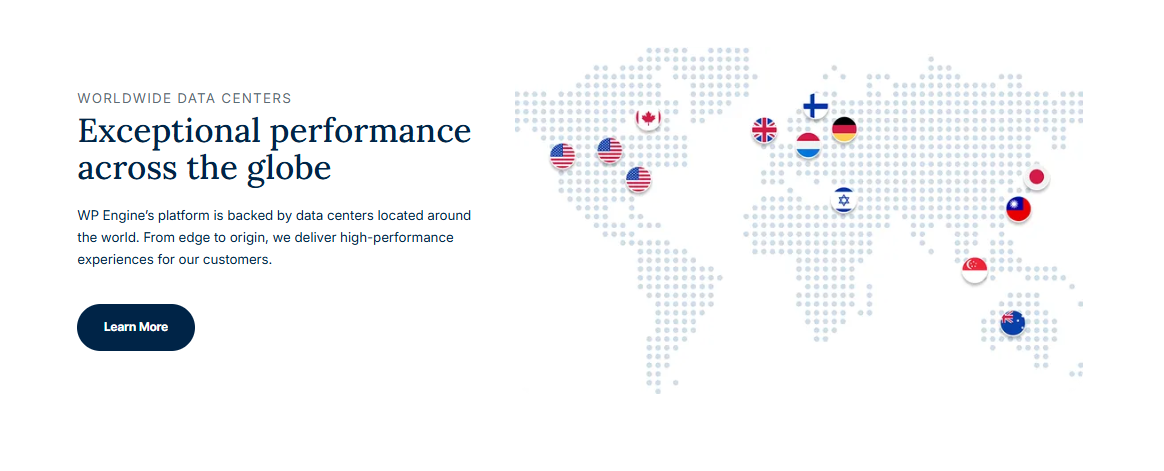
Cloudflare Enterprise integration routes static image, CSS, and JS requests to the nearest edge location, cutting latency for international visitors.
Polished image optimization automatically converts PNG and JPEG files to modern WebP image formats, reducing payload sizes by up to 60%.
Mirage technology dynamically optimizes image loading sequences for mobile connections, delaying off-screen image decoding until needed.
Edge cache rules cache static assets for up to 365 days, while origin revalidation headers ensure updated site code propagates across edge nodes instantly.
HTTP/3 Protocol Configuration & Brotli Compression Tuning
Enabling HTTP/3 protocol support and Brotli compression accelerates content delivery over mobile network connections. Brotli compression algorithms reduce text payload sizes by up to 20% compared to standard Gzip.
HTTP/3 uses QUIC transport protocols, eliminating TCP head-of-line blocking and speeding up asset downloads on mobile networks.
Brotli static asset compression compresses CSS, JS, and HTML files at origin proxy nodes before edge distribution.
To verify active Brotli compression headers on CDN asset responses, inspect HTTP response headers using terminal commands:
curl -I -H "Accept-Encoding: br" https://latestwp.com/style.css
Edge server optimization algorithms minimize latency, boosting Core Web Vitals performance scores across mobile and desktop devices.