7 Best WP Engine Alternatives & Competitors in 2026
Evaluating WP Engine alternatives allows website owners to compare server performance, pricing models, container isolation, and agency billing workflows across top competing platforms. Kinsta, Flywheel, Cloudways, Pressable, SiteGround, Hostinger, and Rocket.net represent the leading managed WordPress hosting alternatives in 2026.
1. Kinsta (Best Premium Google Cloud Alternative)
Kinsta is a top-tier managed WordPress hosting alternative utilizing Google Cloud C2 and C3D isolated LXC containers, Cloudflare Enterprise CDN, and 37+ global data center locations. Kinsta provides isolated PHP workers and dedicated database instances per site node.
Evaluating Kinsta against WP Engine reveals key architectural differences in container isolation versus multi-tenant cluster scaling.
Kinsta isolates every site in a distinct Linux container (LXC), ensuring background processes on one site never impact adjacent tenant database resources.
For detailed server benchmarks, TTFB latency comparisons, and pricing breakdowns, read our detailed WP Engine vs Kinsta comparison.
Both hosts feature Cloudflare Enterprise edge security controls, automated daily backups, and one-click staging environment workflows.
2. Flywheel (Best Managed Hosting for Agencies & Freelancers)
Flywheel is an agency-focused managed WordPress hosting provider owned by WP Engine, featuring white-label client billing transfers, LocalWP desktop synchronization, and custom site blueprints. Flywheel simplifies multi-client portfolio management for creative teams.
Flywheel features streamlined client billing transfer workflows that allow agencies to build sites in temporary sandboxes and transfer hosting invoices directly to clients.
LocalWP desktop integration enables offline site development, allowing developers to test theme code locally before executing remote staging pushes.
For complete agency workflow analysis and feature side-by-side matrices, inspect our exhaustive WP Engine vs Flywheel comparison.
Custom Blueprint templates allow development teams to launch pre-configured WordPress setups with essential plugins and themes pre-installed.
3. Cloudways (Best Flexible Unmanaged Cloud Compute Alternative)
Cloudways is an unmanaged cloud hosting platform allowing site owners to deploy WordPress on DigitalOcean, Vultr, Linode, AWS, or Google Cloud compute nodes. Cloudways provides pay-as-you-go hourly billing and custom NGINX/Varnish caching stacks.
Cloudways offers total server root choice, allowing developers to select specific cloud infrastructure providers and scale RAM allocations on demand.
The platform utilizes the Breeze caching plugin and Object Cache Pro integration to optimize database execution for dynamic WordPress applications.
While Cloudways requires more manual server administration than fully managed hosts, it provides cost-effective hourly pricing for technical site operators.
Comparing server resource costs against managed plan pricing helps buyers choose between self-managed cloud flexibility and fully managed support.
4. Pressable (Best Automattic NVMe E-Commerce Alternative)
Pressable is an enterprise managed WordPress host owned by Automattic, operating on high-speed NVMe server architecture with 99.99% uptime guarantees. Pressable specializes in high-concurrency WooCommerce store hosting.
Built on the same cloud server infrastructure powering WordPress.com, Pressable delivers exceptional database throughput for dynamic e-commerce stores.
All plans include free Jetpack Security licenses, automated daily offsite backups, and 24/7 technical support from WordPress engineering specialists.
Shared WooCommerce caching rules ensure cart and checkout sessions remain uncached while serving product archives from fast edge caches.
5. SiteGround (Best Budget Managed WordPress Alternative)
SiteGround is a popular budget-friendly managed WordPress host operating on Google Cloud infrastructure with custom Ultrafast PHP and SuperCacher speed controls. SiteGround provides built-in SSL certificates, staging, and daily backups for small business sites.
SiteGround utilizes Google Cloud Platform compute instances coupled with custom NGINX reverse proxy caching to maintain fast page load times.
The SG Optimizer plugin integrates directly with server caching layers, allowing site owners to configure image compression and CSS minification easily.
While renewal pricing increases after introductory promotional billing cycles, SiteGround offers lower entry costs for emerging business sites.
6. Hostinger (Best Low-Cost Cloud WordPress Alternative)
Hostinger provides low-cost cloud WordPress hosting powered by LiteSpeed Web Server and LSCache object caching technology. Hostinger offers entry-level pricing with custom hPanel site administration controls and global NVMe storage.
LiteSpeed Web Server integration delivers native server-level page caching, serving static HTML content quickly to mobile site visitors.
Hostinger includes automated AI website builders, free domain registration, and one-click WordPress installation routines for non-technical users.
While Hostinger targets budget-conscious site owners, high-traffic commercial sites often require dedicated managed cloud compute nodes.
7. Rocket.net (Best High-Speed Cloudflare Enterprise Alternative)
Rocket.net is an ultra-fast managed WordPress host utilizing Cloudflare Enterprise edge servers at the origin layer, delivering sub-100ms TTFB metrics globally. Rocket.net features automated Web Application Firewall protection and NVMe cloud storage.
By processing all incoming requests directly on Cloudflare Enterprise edge nodes, Rocket.net bypasses traditional origin server latency bottlenecks.
Full page caching on Cloudflare edge locations ensures static and dynamic assets render rapidly for international visitor audiences.
Automated security suites block malware injections, SQL exploits, and DDoS attacks at the DNS edge layer before traffic reaches web servers.
Managed WordPress Infrastructure Benchmark Matrix
Selecting an enterprise WordPress hosting provider requires benchmarking global TTFB performance, PHP worker allocation, and automated failover capabilities across competing server architectures. The performance metrics below highlight key operational differences between managed platforms.
Evaluating server responsiveness under concurrent load tests reveals distinct architectural advantages across platforms. WP Engine utilizes Google Cloud N2 compute instances coupled with EverCache page caching to maintain sub-200ms response times.
Kinsta leverages Google Cloud C2 and C3D machines, offering dedicated containerized environments per site. This isolates database resource consumption during traffic spikes.
Flywheel targets agencies with streamlined site cloning and team access permissions, utilizing shared NGINX caching layers optimized for small to mid-sized client sites.
Pressable operates on Automattic NVMe server infrastructure, delivering high database throughput for WooCommerce stores requiring frequent uncached dynamic queries.
When selecting an alternative, server memory limits and PHP worker concurrency determine how well your stack scales during viral marketing campaigns.
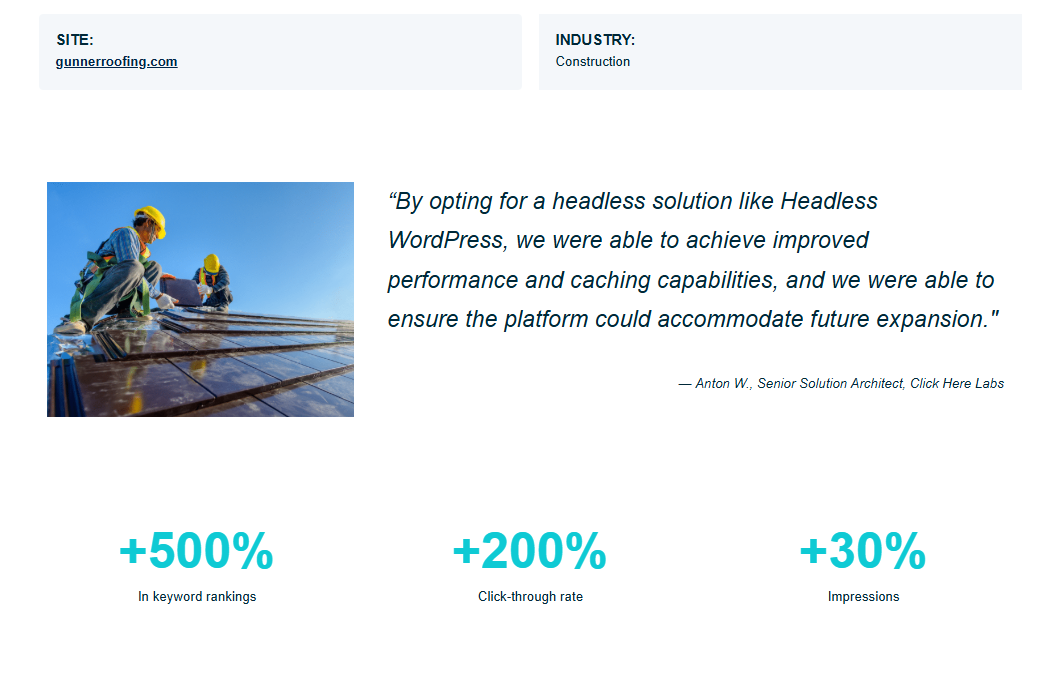
Case study data demonstrates a 5,000% increase in keyword rankings and a 200% click-through rate growth following migration to decoupled headless architecture.
Technical Migration & DNS Switchover Protocols
Migrating from WP Engine to alternative providers requires auditing active DNS TTL settings, exporting database tables, and executing search-and-replace strings. System administrators verify SSL certificates prior to updating primary DNS A-records.
Before initiating host migration, reduce DNS TTL (Time to Live) values to 300 seconds at your domain registrar 48 hours prior to switchover.
Use WP-CLI to export database dumps without including transient cache records, ensuring clean database imports on the target server:
wp db export --quick --single-transaction target_migration.sql
Executing live domain propagation checks ensures zero downtime for active site users during platform migrations.
Enterprise Host Migration Checklist & DNS Propagation Audit
Executing host migrations between WP Engine and alternative providers requires auditing SSL certificate states, exporting MySQL database tables, and verifying NGINX rewrite rules before updating primary DNS A-records.
Before updating domain registrar nameservers, reduce DNS TTL settings to 300 seconds 48 hours prior to switchover to ensure rapid propagation.
Export database tables via WP-CLI without transient cache records to prevent importing bloated transient arrays into new server environments.
Testing staging environments post-migration verifies custom post types, WooCommerce checkout routes, and REST API endpoints prior to domain cutover.
Global Edge CDN Performance & Multi-Region Peering
Comparing Cloudflare Enterprise edge integration across Kinsta, WP Engine, and Rocket.net highlights key latency differences across international user routing nodes. Edge caching minimizes origin server load.
Routing website traffic through global edge networks caches static image assets, CSS files, and JavaScript bundles near end users.
Brotli compression algorithms reduce text document payload sizes by 20% compared to legacy Gzip compression protocols.
HTTP/3 QUIC protocol streaming accelerates mobile asset downloads over cellular networks, improving mobile Core Web Vitals scores.
Frequently Asked Questions About WP Engine Alternatives
Frequently asked questions regarding alternative hosting providers, migration protocols, and server performance comparisons are answered below with direct technical details.
What is the best overall WP Engine alternative?
Kinsta is widely considered the top premium WP Engine alternative due to its isolated Google Cloud C2/C3D container infrastructure, Cloudflare Enterprise CDN, and sub-130ms global response times.
Is Flywheel cheaper than WP Engine for agencies?
Flywheel offers entry plans starting at $15 per month alongside client billing transfer tools and LocalWP desktop sync, making it a cost-effective alternative for creative agencies.
Can I host WordPress cheaper on Cloudways?
Yes, Cloudways allows users to deploy WordPress on DigitalOcean, Vultr, or Linode compute instances with pay-as-you-go hourly billing starting at approximately $14 per month.