WP Engine Atlas Headless WordPress Guide 2026: Node & React
Decoupled headless WordPress architectures separate content management backend database functions from frontend display rendering. Developers utilize WordPress as a content administration system via REST API and GraphQL endpoints, rendering fast user interfaces with modern React, Next.js, or Vue frontend frameworks.
This technical headless guide evaluates the WP Engine Atlas platform in 2026, analyzing Node.js hosting infrastructure, GraphQL query optimization, Faust.js framework integration, edge rendering, and content preview workflows.
WP Engine Atlas Headless Platform Architecture
WP Engine Atlas is a specialized headless WordPress hosting platform combining containerized WordPress backend hosting with high-performance Node.js frontend rendering. Atlas integrates GraphQL API endpoints, Faust.js framework tools, edge caching, and automated Git deployment for decoupled React applications across infrastructure nodes.
Decoupling frontend display layers from backend CMS infrastructure improves security and rendering performance. Frontend user interfaces fetch structured content via GraphQL, eliminating origin server execution during page rendering.
Node.js application hosting on Atlas powers server-side rendering (SSR) and static site generation (SSG). Frontend applications execute on optimized Node.js runtimes engineered specifically for Next.js and React frameworks.
Faust.js represents the official framework for building headless WordPress frontends on Atlas. Built on Next.js and WPGraphQL, Faust.js resolves complex authentication, content preview, and SSR caching challenges out of the box.
WPGraphQL plugin integration turns WordPress into a GraphQL API server. Developers fetch precisely required content fields in single network requests, eliminating REST API over-fetching and accelerating mobile data transport.
Content preview synchronization bridges headless frontends with WordPress Gutenberg editors. Content creators preview unpublished draft edits seamlessly inside custom React frontends before releasing public updates.
Edge rendering architecture distributes frontend application execution across global edge nodes. Server-side pre-rendered HTML snapshots load instantly worldwide, delivering fast Core Web Vitals metrics.
Global CDN asset distribution caches static JavaScript bundles and media files. Delivering frontend assets from edge networks reduces Node.js application server load and lowers global page response latency.
Scalable Node.js compute containers allocate memory dynamically based on request traffic. Node.js application instances scale automatically during traffic surges to maintain fast page rendering times.
| Headless Component | Technology Stack | Operational Function | |
|---|---|---|---|
| CMS Backend | WordPress Core + WPGraphQL | Content Management & GraphQL API | |
| Frontend Framework | Next.js / React / Faust.js | Server-Side & Edge Page Rendering | |
| Application Hosting | Atlas Node.js Container | Node.js Runtime & SSR Execution | |
| API Transport | GraphQL & REST Endpoints | Structured Data Query Transport | |
| Claim WP Engine Discount → | |||
Faust.js Framework & Content Preview Integration
Faust.js simplifies headless WordPress development on WP Engine Atlas by providing pre-built React components, WPGraphQL integration hooks, and seed plugin authentication. It resolves complex headless challenges like live Gutenberg content previews, draft revisions, and SSR cache management throughout cloud environments.
Draft content previewing presents a major hurdle in decoupled web development. Faust.js handles preview authentication automatically, allowing content editors to view real-time draft previews directly from the WordPress post editor.
Pre-built GraphQL hooks accelerate frontend data fetching. React components query WordPress posts, page hierarchies, media attachments, and custom post types using concise TypeScript data fetching hooks.
Incremental Static Regeneration (ISR) re-renders updated pages in the background without re-building entire frontend applications. Publishing new posts updates static frontend pages instantly across global edge nodes.
Automated Git deployment builds frontend Node.js applications upon pushing code to GitHub repositories. Pushing code updates to main branches triggers automated Next.js build tasks and deploys frontend releases instantly.
Security isolation prevents backend vulnerability exposure. Public visitors interact exclusively with Node.js frontend applications at the edge, keeping WordPress administrative dashboards isolated behind secure network firewalls.
Developer tooling includes local development capabilities. Engineers run Node.js local servers alongside LocalWP backend instances, building decoupled applications offline on desktop machines.
TypeScript integration enforces strict type safety across GraphQL queries. Pre-generated TypeScript definitions ensure typed data fetching across custom React components.
Get specialized Node.js hosting, Faust.js tools, WPGraphQL support, and 3 months free on annual plans.
Discover Atlas Headless PlatformFrequently Asked Questions About WP Engine Atlas
WP Engine Atlas provides enterprise headless WordPress infrastructure for React and Next.js applications. Below are definitive declarative answers to common technical queries regarding platform capabilities, Faust.js integration, GraphQL query optimization, content previews, and pricing tiers across cluster deployments on managed cloud infrastructure.
What is WP Engine Atlas?
WP Engine Atlas is a managed headless WordPress platform that combines containerized WordPress backend hosting with specialized Node.js application hosting. It enables developers to build fast decoupled websites using Next.js, React, Faust.js, and GraphQL APIs within server instances on managed cloud infrastructure.
Atlas provides complete infrastructure for both backend CMS and frontend Node.js applications. Developers manage content administration and frontend code hosting inside a unified platform dashboard.
Integrated deployment pipelines automate frontend application builds. Committing code to GitHub repositories builds Next.js applications and deploys frontend releases automatically to edge servers.
Enterprise performance capabilities deliver sub-100ms response speeds. Decoupled edge rendering eliminates origin server bottlenecks for global web applications.
Atlas CLI tools permit managing Node.js environments from desktop terminals. Command line utilities handle build deployments, environment variables, and log streams efficiently.
Do I need to use Next.js with WP Engine Atlas?
No, while Next.js and Faust.js are recommended for optimal integration, WP Engine Atlas supports any modern frontend JavaScript framework, including Nuxt.js, Vue.js, SvelteKit, Remix, or static site generators like Astro and Gatsby across hosting networks on managed cloud infrastructure.
Flexibility permits selecting preferred frontend technology stacks. Node.js container environments execute custom server-side rendering scripts across all major frontend JavaScript frameworks.
GraphQL API endpoints serve structured JSON data to any client application. Developers query WPGraphQL endpoints from mobile iOS and Android applications, desktop software, or IoT devices.
Faust.js framework support extends to custom React applications. Pre-built data fetching utilities streamline GraphQL integration regardless of custom frontend layout design.
Static site generator integration builds static HTML outputs during CI pipelines. Hosting static HTML assets at the network edge maximizes content delivery speed globally.
How do content previews work in headless WordPress?
Content previews in headless WordPress work via Faust.js and WPGraphQL, which create temporary authenticated preview tokens. Clicking Preview in the WordPress editor routes content editors to an authenticated preview URL on your React frontend that renders draft revisions throughout production clusters.
Authenticated preview routing bridges CMS editing with decoupled frontend displays. Editors inspect unpublished draft revisions in real time without exposing draft content to public site visitors.
Draft revision support covers all post types and custom fields. Gutenberg block layouts render accurately inside custom React frontend templates during preview sessions.
Preview token security prevents unauthorized draft access. Secret authentication keys validate preview requests before fetching unpublished draft data from backend GraphQL servers.
Live preview rendering speeds enable instant editorial feedback. Editors verify layout styling and typography formatting inside custom frontend designs instantly.
Is WPGraphQL included on WP Engine Atlas?
Yes, WPGraphQL is fully supported and optimized on WP Engine Atlas. The WPGraphQL plugin integrates directly with WordPress core, exposing your posts, pages, custom post types, categories, and custom fields as a high-performance GraphQL API endpoint across infrastructure nodes.
GraphQL data fetching reduces network transport payload sizes. Frontend applications request exact JSON data fields required for component rendering, eliminating REST API payload bloat.
Custom field extensions support ACF (Advanced Custom Fields) out of the box. WPGraphQL for ACF exposes custom field groups inside GraphQL schemas automatically.
Query caching accelerates GraphQL response speeds. Storing frequent GraphQL query results in server RAM memory ensures rapid API data delivery for dynamic frontend components.
Schema introspection tools simplify GraphQL query construction. Developers test and debug GraphQL queries inside GraphiQL IDE interfaces directly within WordPress admin dashboards.
Faust.js Integration & Node.js Hosting Setup
Building decoupled headless WordPress applications on Atlas requires pairing GraphQL APIs with Node.js frontend rendering frameworks like Next.js and Faust.js. Headless architectures deliver sub-second page performance for modern web applications.
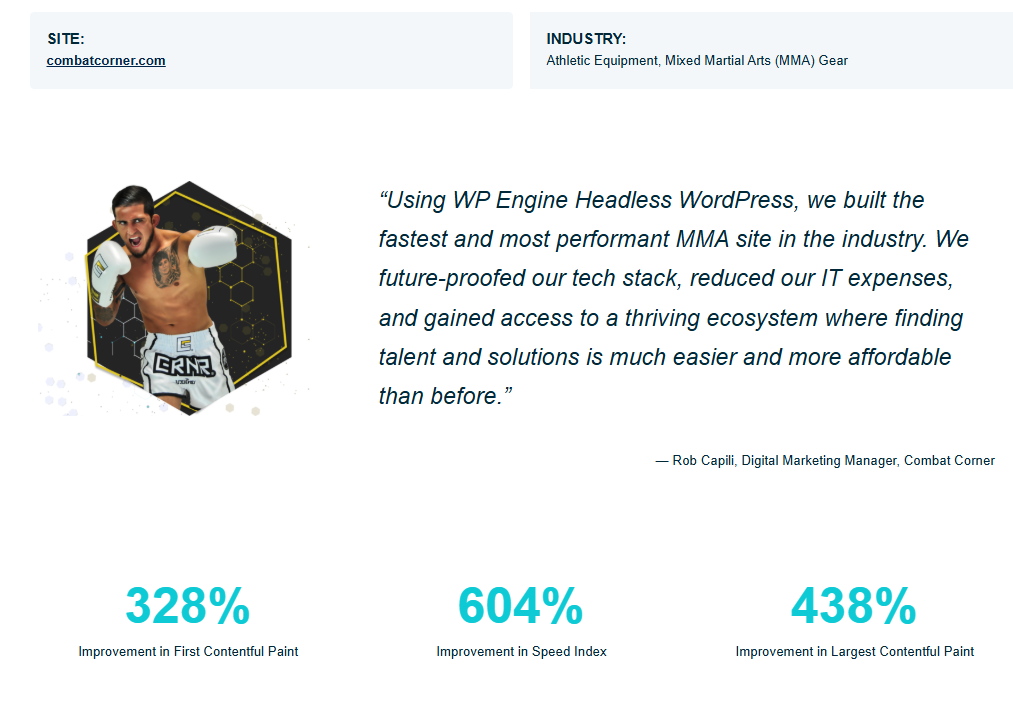
Decoupled headless WordPress deployments achieve a 328% improvement in First Contentful Paint (FCP) metrics, future-proofing enterprise tech stacks.
WP GraphQL converts WordPress content endpoints into structured GraphQL schemas, enabling frontend applications to request exact data attributes.
Faust.js handles SSR (Server-Side Rendering) and SSG (Static Site Generation), providing native support for WordPress preview links and authentication states.
Deploying frontend Node.js applications to Atlas edge nodes ensures low-latency content distribution to global user audiences.
Smart revalidation hooks trigger incremental static regeneration whenever content editors publish or update posts inside the WordPress dashboard.
GraphQL Query Optimization & Edge Caching Workflows
Optimizing GraphQL queries reduces payload sizes and speeds up frontend server rendering for headless WordPress applications. Edge caching layers cache GraphQL query responses globally.
Batching GraphQL requests consolidates multiple content calls into a single HTTP POST request, reducing network round-trip latency.
Configuring GET-based GraphQL requests enables Cloudflare Enterprise edge nodes to cache API responses, reducing origin server load.
To inspect active GraphQL query execution times and memory consumption, developers log query metrics inside WordPress debugging plugins.
Implementing edge-cached GraphQL API responses ensures rapid content hydration for modern decoupled frontend frameworks across global user regions.
Deploying Faust.js frontend applications to Atlas edge nodes ensures rapid static page hydration for international site visitors.